As I was working with the different items in the sandbox this week, I made some early guesses as to which ones I might like and which ones I wouldn't. I was very surprised at the end result after I played with a few of the tools.
I thought that the Voki would be my winner, as it gave you an option to have both an audio and visual. Since so many people are visual learners, I thought this would help engage the audience. I struggled with this tool for a few reasons. One, once I finished customizing my avatar and making my recording, I wasn't happy with the outcome. The final product was a bit too creepy for my taste when the avatar I selected started talking. The other challenge I found was getting the resulting file posted. Many of the methods for posting were not included in the free version (including posting to blogger). I think, though, that this tool would be very engaging in the classroom because the students would be engaged by the avatars. I think you could use it for class announcements or other brief messages.
The next tool I reviewed was Blabberize. This one was also rejected quite quickly, as the idea of talking pictures has never been high on my list of things I like. However, I felt that it was useful to have learned about the site and how it works, because I think kids probably think this is hysterical, and it would be good to know how to use it and be able to teach them how to make audio clips for their own use.
Finally, I remembered why simple is sometimes best. I had previously skipped over Audiopal and Vocaroo because they are both tools that just create audio clips. After my dissatisfaction with the other tools, I went back and recorded in both Audiopal and Vocaroo and was happy with their simplicity. I hadn't originally thought to use Audiopal because of the time limitation. But, with the ease of use, it was great. My final recording was in Vocaroo. I loved that it posted directly to Blogger and created the start of my blog post for me. Personally, I find this type of tool would have limited use in the classroom, as I can't imagine a time when I would create an audio cast vs a webcast. But, maybe those of you working in the classroom have experience with times when a purely audio cast is preferred.
Listen to my clip for an additional observation I had while creating my audio clips.
Vocaroo Voice Message
Thursday, September 28, 2017

Monday, September 18, 2017
I Never Knew
Well, I have to say, this assignment could not have come for me at a better time for me professionally. I recently started a new job in July, and I am being asked more often to create info graphics and short communications out to our company. Not having a design background, I didn't have the know-how to do an info graphic in Adobe Photoshop. It never occurred to me that there would be multiple online tools. I loved this assignment, as it was especially relevant for me and I was able to build something I could use immediately for my work.
So, below you will find the info graphic I created. I used a Canva template. I found that the tool itself does not work well with Internet Explorer, and had a much easier time editing it and making it my own in the Google Chrome browser. In IE, I couldn't easily see all the text boxes in the template. So, if any of you are struggling with the templates on that site, I suggest trying out a different browser. I think that is one thing I would recommend to students working on creating their own designs - remember that not all online tools are friendly with all browsers. Also, they should not be discouraged if they don't find a good template on one site, as there are many more available on similar sites. Finally, a tool like Canva makes it easy to start from the ground up - as they have blocks of headings/content/etc that are drag and drop for you to work with if you don't find a template that meets your needs.
I anticipate I will be using these sites daily in the upcoming weeks for my job, so as I learn additional tips, I will add them to the blog. Hopefully, all of you will benefit from my info graphic - as it has some good tips for keeping data secure in your workplace!

So, below you will find the info graphic I created. I used a Canva template. I found that the tool itself does not work well with Internet Explorer, and had a much easier time editing it and making it my own in the Google Chrome browser. In IE, I couldn't easily see all the text boxes in the template. So, if any of you are struggling with the templates on that site, I suggest trying out a different browser. I think that is one thing I would recommend to students working on creating their own designs - remember that not all online tools are friendly with all browsers. Also, they should not be discouraged if they don't find a good template on one site, as there are many more available on similar sites. Finally, a tool like Canva makes it easy to start from the ground up - as they have blocks of headings/content/etc that are drag and drop for you to work with if you don't find a template that meets your needs.
I anticipate I will be using these sites daily in the upcoming weeks for my job, so as I learn additional tips, I will add them to the blog. Hopefully, all of you will benefit from my info graphic - as it has some good tips for keeping data secure in your workplace!

Thursday, September 14, 2017
A Picture is Worth 1000 Words
As many of you know, I am a career switcher. To determine if I wanted to move careers entirely, I shadowed our elementary librarian for a day. One of the things that resonated with me during that day is that librarians spend a good deal of time doing research or teaching students how to research. I liked the image below because it is clearly a woman on the hunt online! I like to infuse humor, so using this image and then talking about other uses for the internet hopefully would garner some amusement.

StockSnap (2017). laptop-computer-modern-technology. [photograph] Pixabay. Retrieved from https://cdn.pixabay.com/photo/2017/08/07/04/06/laptop-2599645__340.jpg CC Zero
I also imagine that there will be times as a librarian we'll be setting up features around specific books in the library (banners, posters, et al). So, in thinking about promoting specific authors, I searched for some of my favorite books to look for photos that might make a good display. I really liked this photo with not only the books but with items from the books represented in the theme.
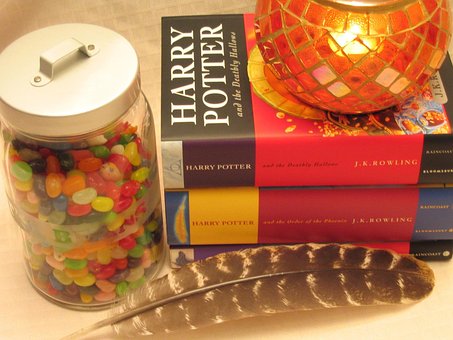
Natasha G (2014). harry-potter. [photograph] Pixabay. Retrieved from https://cdn.pixabay.com/photo/2014/08/14/16/32/harry-potter-418108__340.jpg CC Zero
I was intrigued by Big Huge Labs ability to create the color palatte from your photo, much like the book discussed, but I couldn't figure out how to take an IMAGE of the color palette. I was hoping to upload my picture and the corresponding palette that Big Huge Labs created. So, in lieu of that, I created a motivational poster from the second image, encouraging reading.
 Natasha G (2014). harry-potter. [photograph] Pixabay. Retrieved from https://cdn.pixabay.com/photo/2014/08/14/16/32/harry-potter-418108__340.jpg CC Zero. Modified using Big Huge Labs.
StockSnap (2017). laptop-computer-modern-technology. [photograph] Pixabay. Retrieved from https://cdn.pixabay.com/photo/2017/08/07/04/06/laptop-2599645__340.jpg CC Zero
I also imagine that there will be times as a librarian we'll be setting up features around specific books in the library (banners, posters, et al). So, in thinking about promoting specific authors, I searched for some of my favorite books to look for photos that might make a good display. I really liked this photo with not only the books but with items from the books represented in the theme.
Natasha G (2014). harry-potter. [photograph] Pixabay. Retrieved from https://cdn.pixabay.com/photo/2014/08/14/16/32/harry-potter-418108__340.jpg CC Zero
I was intrigued by Big Huge Labs ability to create the color palatte from your photo, much like the book discussed, but I couldn't figure out how to take an IMAGE of the color palette. I was hoping to upload my picture and the corresponding palette that Big Huge Labs created. So, in lieu of that, I created a motivational poster from the second image, encouraging reading.

Saturday, September 9, 2017
In Defense of Comic Sans...
No? Just seeing if you're awake.
To be honest, I didn't really think much about font selection when creating either my resume or blog, because I have always been drawn to simple styles. Having worked in a professional setting, I have been trained in the use of sans serif fonts and their usefulness in professional writing. Thus, when I selected a template for this blog, I was naturally inclined to select one that already leveraged a sans serif font, Helvetica to be precise. I definitely agree with the author on many fronts when it comes to fonts, especially when he writes: Helvetica may be neutral, but in proper context it's not bland; in fact it's quite beautiful(Reynolds, 2014, p.47).
For my resume, I have been using Calibri in my drafts for years now, so it just fell into place without having to think about whether my selected font presents a nice design feel. These are two fonts that when I use them, I get my own personal zen, because they just feel right for me.
Reynolds, G.(2014) Presentation Zen Design: a simple visual approach to presenting in today's world (2nd Ed). San Francisco, CA: New Riders.
Subscribe to:
Posts (Atom)